Every business owner I’ve met believes they have backups.
Most of the time, they’re right.
The problem is that many businesses don’t discover whether those backups actually work until the day they need them.
I’ve seen organizations lose years of financial records because a backup had been failing silently for months. I’ve seen ransomware encrypt both production data and the backup server because they shared the same credentials. I’ve also seen businesses spend thousands of dollars on backup software, only to discover no one had ever performed a successful restore test.
None of these failures happened because the business owners didn’t care about protecting their data. They happened because modern IT has become increasingly complex, and it’s easy to assume that a green checkmark or a “Backup Successful” notification means you’re protected.
It doesn’t.
A backup isn’t valuable because it exists. It’s valuable because it can be restored—quickly, completely, and when your business depends on it.
At Kind Cloud Solutions, we believe technology should create confidence, not uncertainty. That means designing backup and recovery strategies that are secure, regularly tested, and simple enough that you know exactly what will happen if disaster strikes.
Before you assume your business is protected, take a few minutes to answer these seven questions. Your answers may reveal strengths in your current strategy—or uncover risks that are much easier to fix today than during an emergency.
Question 1: Can You Actually Restore Your Files?
If I could ask every business owner just one question about their backups, it would be this:
“When was the last time you successfully restored a file?”
Not when did your backup software report “Success.”
Not when did you receive the daily email saying everything completed without errors.
Actually restored a file.
Because here’s the truth: a backup and a successful restore are not the same thing.
Think of it this way. Owning a fire extinguisher doesn’t guarantee it will work when there’s a fire. It has to be maintained, inspected, and tested. Your business backups deserve the same level of confidence.
I’ve worked with organizations that proudly showed me months of successful backup reports. Everything looked healthy. Green checkmarks across the board.
Then we performed a restore test.
The backup catalog was corrupted.
Critical files were missing.
Recovery points were incomplete.
What everyone believed was a safety net turned out to be little more than a false sense of security.
That’s why, at Kind Cloud Solutions, we don’t consider a backup successful until we’ve proven it can be restored. A backup that can’t be recovered when you need it isn’t a backup—it’s simply a copy of data you hope will be there.
Ask Yourself
Take a moment and answer these questions honestly:
Could you restore a single file that was accidentally deleted yesterday?
Could you recover your accounting system if the server failed this afternoon?
If ransomware encrypted every computer in your office, how quickly could you get back to work?
Who has actually verified that your recovery process works?
If any of those questions leave you uncertain, you’re not alone. Many businesses invest in backup software but never test the most important part of the process: recovery.
What We Recommend
A reliable backup strategy should include regular restore testing—not just automated backup jobs. At a minimum, your IT provider should periodically verify that:
Individual files can be restored successfully.
Entire systems can be recovered if needed.
Recovery times meet your business requirements.
Backup data hasn’t been corrupted.
The recovery process is documented and repeatable.
Because when the unexpected happens, your business doesn’t need a backup report.
It needs its data back.
Question 2: Who Is Checking Your Backups?
Backup software doesn’t care if your business can recover.
It does exactly what it’s programmed to do.
If a scheduled backup fails, it records the failure. If storage is running out, it generates an alert. If a backup completes successfully, it reports that too.
But software doesn’t ask the next question.
“Did anyone see this?”
One of the biggest risks we see isn’t failed backups—it’s unattended backups.
An alert is only valuable if someone reads it.
A warning only matters if someone investigates it.
And a failed backup only gets fixed if someone takes ownership.
Imagine your smoke detector chirping because the battery is low.
If no one is home, the battery doesn’t magically replace itself.
Your backup systems work much the same way. They rely on people paying attention.
At Kind Cloud Solutions, we believe every critical system should have a responsible owner. Someone who reviews backup reports, investigates failures, verifies storage capacity, and confirms that your business remains protected—not just today, but every day.
Technology can automate many tasks.
It cannot automate accountability.
Ask Yourself
Consider these questions:
Who reviews your backup reports each morning?
If last night’s backup failed, who would know?
How quickly would someone investigate and correct the problem?
If your IT provider was unavailable tomorrow, would anyone else know the status of your backups?
If the answer to any of these questions is, “I’m not sure,” you’ve identified a business risk—not just an IT issue.
What We Recommend
Every business should have a documented backup verification process that includes:
Daily review of backup success and failure reports.
Investigation of any warnings or failed jobs.
Monitoring of backup storage capacity and retention.
Verification that critical systems are included in the backup schedule.
A designated person—or trusted IT partner—who owns the process from start to finish.
Backups don’t protect your business.
People who verify backups do.
The software is the tool.
Accountability is the protection.
Question 3: Are Your Microsoft 365 Emails Really Backed Up?
If your business uses Microsoft 365, here’s one question that’s worth asking:
If an important email disappeared today, could you get it back six months from now?
Many business owners confidently answer, “Yes.”
After all, it’s in the cloud.
Microsoft must have it.
The reality is a little more nuanced.
Microsoft does an outstanding job of keeping Microsoft 365 available, secure, and resilient. Their global infrastructure is designed to protect against hardware failures, power outages, and even the loss of entire datacenters.
That’s one of the reasons millions of businesses trust Microsoft 365 every day.
But there’s an important distinction that often gets overlooked.
Keeping the service running isn’t the same as protecting your business’s data forever.
Think of it like renting a secure apartment.
The building owner is responsible for maintaining the building, keeping the lights on, and making sure the elevators work.
You’re responsible for what you keep inside your apartment.
The same principle applies to Microsoft 365.
Microsoft is responsible for operating the platform.
Your business is responsible for protecting its data.
This is known as the Shared Responsibility Model, and understanding it can help prevent an expensive mistake.
What Does That Mean?
If an employee accidentally deletes an email, empties the Deleted Items folder, or a malicious insider removes important information, Microsoft’s built-in retention features may help—but only if they’re configured correctly and the data is still within the applicable retention period.
Likewise, if ransomware encrypts files that are synchronized across your devices, or if important information is overwritten, recovering exactly what you need may not always be straightforward without an independent backup.
For many businesses, email isn’t just communication.
It’s contracts.
Customer conversations.
Invoices.
Purchase orders.
Legal records.
Years of business history.
Losing access to that information can disrupt operations, create compliance challenges, and damage customer relationships.
Ask Yourself
Take a moment to consider these questions:
If your CEO’s mailbox was accidentally deleted, how would you recover it?
If an employee left the company last year, could you still retrieve an important email they sent?
Do you know how long your business retains deleted emails?
Have you ever tested restoring Microsoft 365 data?
If you’re unsure of the answers, you’re not alone. Many organizations assume Microsoft is providing a complete backup solution when, in reality, protecting business data is a shared responsibility.
What We Recommend
At Kind Cloud Solutions, we recommend that every business using Microsoft 365 have an independent backup solution for Exchange Online, OneDrive, SharePoint, and Microsoft Teams.
That way, if something is accidentally deleted, maliciously removed, or simply needed months or years later, you have a separate copy of your data that you control.
Cloud services provide incredible reliability.
Independent backups provide confidence.
Together, they help ensure your business can keep moving forward, no matter what tomorrow brings.
Question 4: If Disaster Strikes Today, How Long Would It Take to Get Your Business Back?
Imagine arriving at work tomorrow morning.
No one can log in.
Email isn’t working.
Your accounting system won’t open.
Customer files are unavailable.
The phones are ringing, but your team has no information to help the people calling.
Now ask yourself one simple question.
How long could your business operate like this?
An hour?
A day?
A week?
For many business owners, the honest answer is, “I don’t know.”
And that’s one of the biggest risks of all.
Recovery Isn’t Instant
One of the most common misconceptions about backups is that restoring your data is as simple as pressing a button.
Sometimes it is.
Often, it isn’t.
Recovering a single deleted document might take only a few minutes.
Restoring an entire server, dozens of employee computers, cloud services, and years of business data can take hours—or even days—depending on how your systems were designed.
That’s why backup is only part of the conversation.
Recovery is what keeps your business running.
Introducing Recovery Time Objective (Without the Jargon)
In the technology world, there’s a term called the Recovery Time Objective, or RTO.
It sounds complicated, but the idea is simple.
RTO answers one question:
“How quickly does my business need to be operating again after something goes wrong?”
Every business has a different answer.
A law office preparing for trial may need access to files within an hour.
A medical practice may need patient records immediately.
A retail business could lose thousands of dollars during a busy weekend if its systems are offline.
The right recovery time depends on your business—not on the backup software you purchased.
Ask Yourself
Take a moment to consider these questions:
If your primary server failed this afternoon, when would your team realistically be working again?
How much revenue would you lose for every hour your systems were unavailable?
Which business systems need to come back first?
Has anyone ever walked you through what recovery would actually look like?
If you don’t know the answers, you’re not alone.
Many businesses have invested in backups but have never developed a recovery plan.
What We Recommend
At Kind Cloud Solutions, we believe every backup strategy should begin with a business conversation—not a technology conversation.
We ask questions like:
How much downtime is acceptable?
Which systems are most critical?
What would one day without email cost your business?
What would happen if your accounting system was unavailable for two days?
Only then do we recommend backup and recovery solutions that match your operational needs.
Because buying the fastest backup solution doesn’t always make sense.
Buying one that’s too slow for your business doesn’t either.
The goal is finding the right balance between protection, recovery time, and cost.
The Bottom Line
A backup tells you your data exists.
A recovery plan tells you when your business can serve customers again.
That’s the number that matters.
Because your clients don’t measure success by how well your backups performed.
They measure it by how quickly you were back in business.
Question 5: What Happens If Ransomware Encrypts Everything?
Ransomware has changed the way businesses need to think about backups.
Years ago, a backup was primarily designed to recover from hardware failures, accidental file deletions, or natural disasters.
Today, it also has to survive a deliberate attack.
Modern ransomware doesn’t just target your files.
It often searches for backup servers, network storage, and cloud-connected data. If attackers can encrypt or delete your backups before demanding a ransom, recovering your business becomes far more difficult.
That’s why one of the most important questions you can ask is this:
“If every computer in our business were encrypted today, would we still have a clean copy of our data?”
If the answer is “I’m not sure,” it’s time to review your backup strategy.
One Copy Is Never Enough
A common mistake is storing every backup in one place.
If your only backup lives on the same network as your production systems, it may be vulnerable to the very event it’s supposed to protect you from.
Good backup strategies assume that one layer of protection could fail.
Great backup strategies prepare for it.
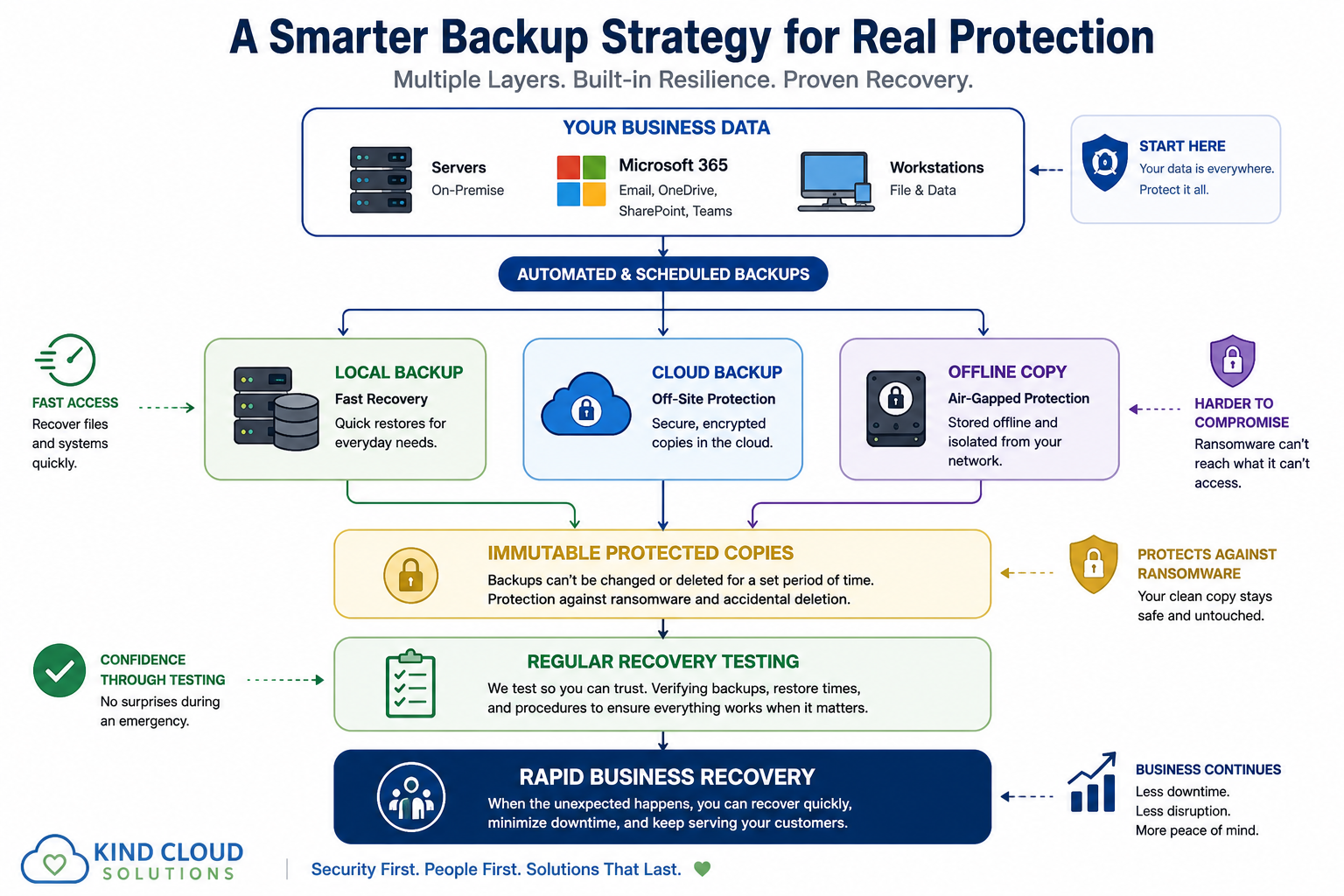
Building Multiple Layers of Protection
At Kind Cloud Solutions, we encourage businesses to think about backups the way they think about emergency exits.
You don’t want just one way out.
You want options.
That’s why we recommend multiple, independent copies of your critical business data.
Immutable Backups
An immutable backup is designed so it cannot be changed, encrypted, or deleted for a defined period of time—even if an attacker gains administrative access.
Think of it as placing an important document in a sealed safety deposit box.
You can retrieve it when you need it, but no one can quietly alter or destroy it in the meantime.
This provides an additional layer of protection against ransomware and accidental deletion.
Offline Backups
Offline backups are stored separately from your everyday business network.
Because they aren’t continuously connected, they are much harder for ransomware to reach.
Even if every device in your office were compromised, an offline copy can remain untouched and available for recovery.
Cloud Backups
Cloud backups provide another important layer of resilience by storing encrypted copies of your data in secure, geographically separate locations.
If your office experiences a fire, flood, theft, or major hardware failure, your backup still exists somewhere else.
The goal isn’t to replace local backups.
It’s to ensure your business isn’t relying on a single location or a single technology.
Ask Yourself
Consider these questions:
If ransomware encrypted every server and computer today, what would your recovery plan be?
Are your backups stored somewhere attackers can’t easily reach?
Do you maintain more than one copy of your critical business data?
When was the last time you verified that your backup copies could actually be restored?
If those questions are difficult to answer, you’re not alone.
Many organizations invested in backup solutions years ago, before today’s ransomware threats became so sophisticated.
What We Recommend
At Kind Cloud Solutions, we believe resilience comes from layers—not luck.
That’s why we recommend backup strategies that include:
Multiple copies of critical business data.
Secure cloud backups stored separately from production systems.
Offline or isolated backup copies whenever practical.
Immutable storage to help protect against ransomware.
Regular recovery testing to confirm every layer works as expected.
No single technology can eliminate every risk.
But thoughtful planning, multiple layers of protection, and regular verification can dramatically improve your ability to recover from the unexpected.
The Bottom Line
The question isn’t whether your business has backups.
The question is whether your backups can survive the same event that takes your business offline.
Because in the middle of a ransomware incident, the safest copy of your data isn’t the one that’s easiest to reach.
It’s the one the attackers couldn’t touch.
Question 6: Could One Stolen Password Wipe Out Your Backups?
Imagine for a moment that a cybercriminal discovers the password to your business email account.
It’s a concerning thought—but by itself, it may not be catastrophic.
Now imagine that same password also unlocks your backup system.
Suddenly, the very thing you were counting on to recover your business could disappear before you even realize there’s a problem.
This isn’t a hypothetical scenario.
Many cyberattacks begin with something surprisingly simple: a stolen password. Whether it’s obtained through phishing, malware, password reuse, or a previous data breach, a single compromised account can become the key that unlocks multiple systems.
That’s why protecting your backups isn’t just about where they’re stored.
It’s also about who can access them.
Your Backups Should Be Harder to Reach Than Your Everyday Systems
Think of your backup system like the emergency key to your business.
You wouldn’t leave it hanging on the same hook as the front door key.
You’d secure it separately, limit who can use it, and make sure it’s there when you truly need it.
The same principle applies to digital systems.
The accounts that manage your backups should be protected more carefully than the accounts used for day-to-day work.
Three Simple Practices That Make a Big Difference
Use Multi-Factor Authentication (MFA)
Passwords can be guessed, stolen, or reused.
Multi-factor authentication adds a second layer of verification—such as a code from an authenticator app or a security key—making it significantly more difficult for an attacker to gain access, even if they know your password.
It’s one of the simplest and most effective ways to protect critical systems.
Keep Backup Credentials Separate
Your backup administrator account should not be the same account used to read email, browse the web, or perform everyday business tasks.
Dedicated backup credentials reduce the chance that a compromise in one area of your business also compromises your ability to recover.
If an attacker gains access to a standard user account, they shouldn’t automatically gain access to your backup environment.
Follow the Principle of Least Privilege
Not every employee—and not every administrator—needs full access to every system.
The Principle of Least Privilege means giving people only the permissions they need to perform their work, and no more.
If an account is compromised, limiting its access helps contain the damage.
Good security isn’t about distrust.
It’s about reducing unnecessary risk.
Ask Yourself
Consider these questions:
Does every administrator really need access to your backup system?
Is multi-factor authentication enabled for your backup platform?
Are backup administrator accounts used only for backup administration?
If one employee’s password were stolen today, how much of your environment could an attacker access?
If you’re uncertain about any of these answers, your backup environment may be more exposed than you realize.
What We Recommend
At Kind Cloud Solutions, we treat backup systems as some of the most critical assets in a business.
That means:
Protecting every backup administrator account with multi-factor authentication.
Using dedicated credentials that aren’t shared with everyday business activities.
Limiting administrative access to only those who genuinely need it.
Reviewing permissions regularly to ensure they remain appropriate.
Monitoring administrative activity so unusual behavior can be investigated quickly.
These measures don’t make your business invincible.
But they do make it significantly harder for an attacker to compromise the systems you’ll depend on during an emergency.
The Bottom Line
Your backups are your last line of defense.
Protect them accordingly.
Because the strongest backup strategy in the world won’t help if an attacker can simply sign in and delete it.
Security isn’t just about keeping attackers out.
It’s about making sure your path to recovery is still there when you need it most.
Question 7: When Was the Last Time You Tested Your Recovery Plan?
Here’s one final question.
It may be the most important one in this entire guide.
When was the last time you actually tested restoring your business?
Not just a single document.
Not just opening the backup software to make sure yesterday’s job completed successfully.
An actual recovery.
A real test.
Because the worst possible time to discover a problem with your backups is during the emergency you’ve been preparing for.
Confidence Comes From Testing
Pilots don’t wait until an engine fails to practice emergency procedures.
Fire departments don’t train after a building catches fire.
Businesses shouldn’t wait until disaster strikes to find out whether their recovery plan actually works.
Testing isn’t about expecting something to fail.
It’s about building confidence that everything will work when it matters most.
Every successful recovery test answers important questions:
Can we restore our data?
How long does recovery actually take?
Are our documented procedures accurate?
Does everyone know their role?
Have any systems been missed?
Those answers are difficult to discover during a crisis.
They’re much easier to learn on a quiet Tuesday morning.
Recovery Testing Reveals More Than Broken Backups
One of the greatest benefits of recovery testing is that it often uncovers issues you weren’t looking for.
Perhaps a critical server wasn’t included in the backup schedule.
Maybe a recently deployed application isn’t being protected.
Perhaps someone changed administrator credentials without updating your documentation.
Or maybe your recovery takes six hours when everyone assumed it would take one.
These aren’t failures.
They’re opportunities to improve your resilience before your business depends on it.
Every successful test strengthens your recovery strategy.
Every issue you uncover today is one less surprise tomorrow.
Ask Yourself
Take a few moments to consider these questions:
When was your last full recovery test?
Who participated in the test?
Were your recovery objectives achieved?
Did you document what worked—and what could be improved?
If your primary systems failed tomorrow morning, how confident are you that your team could recover?
If those questions are difficult to answer, you’re not alone.
Many businesses invest in backup technology but never invest the time to verify that recovery is practical, documented, and repeatable.
What We Recommend
At Kind Cloud Solutions, we believe recovery testing should be a routine part of every business continuity plan—not an afterthought.
A practical recovery test should verify that:
Critical business data can be restored successfully.
Key systems return to service within acceptable timeframes.
Backup copies remain complete and uncorrupted.
Recovery documentation is current and accurate.
Everyone involved understands their responsibilities.
Technology changes.
Businesses grow.
People come and go.
Testing ensures your recovery plan keeps pace with those changes.
The Bottom Line
Backups create possibilities.
Recovery testing creates confidence.
At Kind Cloud Solutions, we believe the goal isn’t simply to back up your business.
It’s to make sure your business can recover when it matters most.
Because when your customers, employees, and community are depending on you, hope isn’t a recovery strategy.
Preparation is.